How to Renew US Passports Online or by Mail (For Adults and Kids)
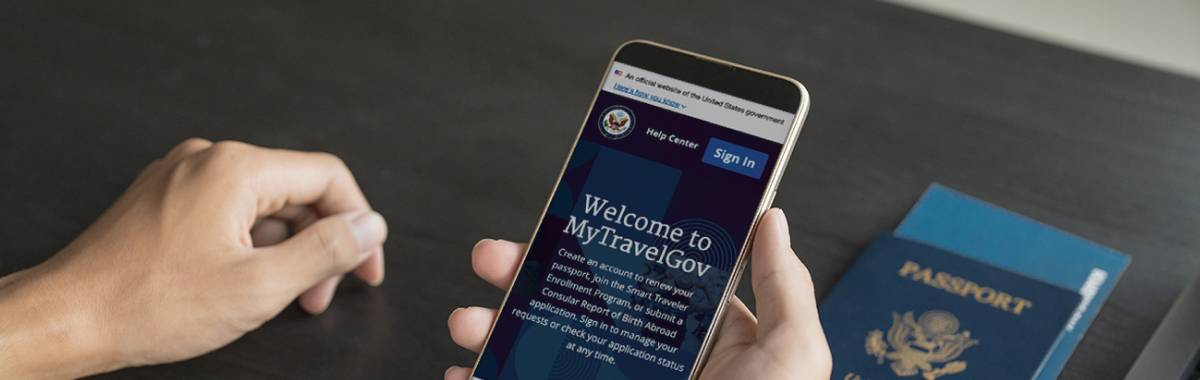
When traveling outside the United States, you won’t (or shouldn’t) get too far past TSA or customs without a valid passport. Fortunately, renewing your passport is now easier than ever, thanks to the U.S. Department of State offering an online renewal option. If you don’t qualify for online renewal or prefer a traditional method, you can still renew your passport by mail.
See how our travel protection plans can help with lost or stolen passports
In this article, we will walk you through both the online and mail-in processes for renewing your passport.
Quick Links:

Renew Online
Step one Confirm you meet the requirements
Requirements for Renewing Your Passport Online: You can renew your passport online if you meet all of the following requirements:
- Your current or most recent passport was valid for 10 years, and you are age 25 or older.
- The passport you are renewing is either expiring within one year or has expired less than five years ago.
- You are not changing your name, sex, date of birth, or place of birth.
- You are not traveling for at least 6 weeks from the date you will submit your application.
- You are applying for a regular (tourist) passport. You cannot renew a special issuance (diplomatic, official, or service) passport online.
- You live in the United States (either state or territory). You do not qualify to renew online if you live in a foreign country or have an Army Post Office (APO), Fleet Post Office (FPO), or Diplomatic Post Office (DPO) address.
- You have your passport with you, and it is not damaged or mutilated, and you have not reported it as lost or stolen.
- You can pay for your passport using a credit or debit card.
- You can upload a digital passport photo.
- You are aware that we will cancel the passport you are renewing after you submit your application. You cannot use it for international travel.
2. Step Two Create Your Account:
Click the Sign In button on the MyTravelGov homepage. This will redirect you to Login.gov, where you can either sign in as an existing user or create a new account.
Step Three Start Application:
After creating your account, select the "Renew Your Passport" link on the MyTravelGov home page to start your application.
What you will need:
- Your most recent U.S. Passport and/or Card
- Digital passport photo
- Credit or Debit card
This application should take about 40 minutes to complete
You can save your application and finish it at a later date. You have 7 days to complete your application after you start it. If you do not complete your application in 7 days, you will need to start over.
Times for your passport renewal:
- Routine: 4 to 6 weeks
- Expedited: Not available when renewing online. If you need expedited service, go to the Renew by Mail page and submit your Form DS-82 application by mail.
- Expedited at Agency: Must have international travel within 14 calendar days. Make an appointment at a passport agency.
Step Four Upload Passport Information:
At this stage, the Department of State checks the passport(s) you are renewing against their records to see if you can renew online.
- Enter your information exactly as it appears on the passport you are renewing.
- If you are not eligible to renew online, the system will give you a list of reasons. Double check your information before re-submitting it.
- Make sure you have your passport in hand to fill in your passport number and the name that the application is expecting
Validity of Most Recent Passport: Make sure your most recent passport is or was valid for 10 years. The passport must be expiring within one year or have been expired less than five years.
Passport Book, Passport Card, or Both Documents: You can renew passport books and passport cards online. If you just want to renew a passport book, leave the card section blank on the application. If you just want to renew a passport card, leave the book section blank.
Step Five Enter Travel Plans:
If you are traveling within 6 week you cannot apply online. The US Department of State only offers routine service.
- Routine times do not include mailing times.
- Routine times are the same for customers who renew online and by mail.
Need your passport in 3-6 weeks? Get expedited service and renew by mail.
Need your passport in less than 3 weeks? Make an appointment to renew in person at a passport agency or center.
Step Six Upload Digital Photo:
You will need to upload an original, digital photo in .JPEG file format.
- Go to the Uploading a Digital Photo page to see photo examples and requirements.
- Have someone else take your photo. No selfies.
- Do not scan a photo, or take a photo of an already printed photo.
Step Seven Payment:
Paying for your Passport
To complete your application, you must pay all passport fees using a credit or debit card. Click the “Sign and Pay” button in your application which will take you to pay.gov where you will pay your passport fees.
Confirming Payment
You will receive email updates about your payment status. The first email will notify you that your payment is pending. The second email will confirm they have processed your payment. If the U.S. Department of State is unable to process your payment, you will receive an email asking you to login to your account and pay again.
Check your spam or junk folder if you do not see the emails in your inbox.
Keep Your Most Recent Passport
When you complete your application, you will need the passport you are renewing on hand. Keep your most recent passport. Do not mail it to the U.S. Department of State, or try to use it to travel since they will cancel it.

Step Eight Enroll in Email updates:
One week Per site after you apply, go to the Online Passport Status System to enroll in more emails about the status of your application. They will notify you when your application is in process, approved, and when your passport is shipped. They will also notify you if they need more information to process your application.
The Application Status page includes details about what each status message means.
This video explains what to do after you apply
Renew By Mail
Step one check if you are eligible to renew by mail:
You can renew by mail if your most recent passport:
- Can be submitted with your application*,
- Is not damaged (other than normal wear and tear),
- Has never been reported lost or stolen,
- Was issued within the last 15 years,
- Was issued when you were age 16 or older, and
- Was issued in your current name (or you can provide a document like a marriage certificate or divorce decree to show you have changed your name)
If you want to renew a limited validity passport that is valid for less than the normal period of 10 years, you must meet these requirements:
- One of your previous passports must have been issued for 10 years,
- Your passport cannot be limited because you’ve lost multiple passports, and
- Your passport cannot be limited because you’ve had multiple damaged passports
If you do not meet these requirements to renew, go to one of these pages to learn how to apply:
*If you have a passport book and want to get your first passport card, submit your book. If you have a passport card and want to get your first passport book, submit your card.
Step Two Fill Out An Application:
Use DOS's Form Filler tool to fill out your form on a desktop or laptop computer and then print it.
Tips to complete your form:
- Complete all parts of the form. Sign and date your form before you mail it.
- Print your form on single-sided paper. They do not accept double-sided forms.
- Check your date of birth and previous passport issuance date if you did not get the form you expected to receive on the form filler.
- You can renew a passport book, a passport card, or both.
- Use Form DS-82 to apply for your first passport book if you only have a passport card, or to apply for your first passport card if you only have a passport book.
- For the well seasoned traveler we recommend opting for more visa pages. Check the 'large book' box at the top of the DS-82 to get more pages on your passport.
- If renewing from Canada, do not include your Canadian Social Insurance Number on the form.
Step Three Submit Your Most Recent US Passport:
When you renew by mail or in person, you must submit your most recent passport with your application. They will return your most recent passport book or card in a separate mailing. The most recent passport may not arrive for up to four weeks after you get your new passport.
Step Four (optional) Submit Additonal Documents if You Are Changing Your Name:
If the name you are using is different from the name on your most recent U.S. passport, you must provide a certified copy of the legal name change document. Examples include:
- Marriage certificate
- Divorce decree
- Court-ordered name change document
Your name change document will be returned to you in a separate mailing from your new passport.
Step Five Provide A Photo:
You must provide one photo with your application. Go to the Passport Photo page for photo requirements and to see examples of photos. You can get a photo at:
- Some passport acceptance facilities like CVS’s, Walgreens, or even Grocery stores.
- A company which offers photo services
- Home. Ask a friend or family member to take your photo. Print it on glossy or matte photo quality paper.
Other reminders
- You must staple your photo to the application. Follow the instructions on the application. Use four staples vertically in the corners as close to the outer edges of the photo as possible.
- Do not bend the photo.
Step Six Calculate fees:
Pay using a personal check or money order and make it payable to the U.S. Department of State. Do not send cash.
Go to their Passport Fees page to learn more about how much it costs to apply for a passport and how you can pay.
Step Seven Submit Completed Application and Documents:
Get My Passport Fast: If you are traveling in less than 3 weeks, make an appointment to renew in person at a passport agency or center. Your appointment must be within 14 calendar days of your travel date.
If you are traveling in more than 3 weeks, mail your completed application and documents to one of the addresses below.
Where you mail the application depends on where you live, and how fast you need your passport.
If you live in the United States, use the United States Postal Service (USPS). If you live in Canada, use Canada Post.
Where to Send My Application and Supporting Documents
I want routine service and I live in California, Florida, Illinois, Minnesota, New York, or Texas. | I want routine service and I live in any other state or in Canada. | I want expedited service. |
National Passport Processing Center | National Passport Processing Center | Write "EXPEDITE" on the outside of the mailing envelope: National Passport Processing Center |
You may receive your passport and supporting documents in separate mailings.
If you are renewing a passport card, they will send it to you via First Class Mail. They do not use 1-2 day delivery services for passport card only applications.
Outside the United States (any country besides Canada): Contact your U.S. embassy and consulate.
Step Eight Track Your Application Status:
You can subscribe to email updates about your application status, and learn more about each status update.
It may take 2 weeks from the day you apply until your application status is “In Process.”
Frequently asked questions:
Can I submit multiple passport renewals in one envelope?
Yes. If your family member or spouse is also renewing a passport, you may want to send multiple applications in the same envelope. You can pay for the applications using one check or money order. Make sure to add up the correct fees for multiple applications.
Can I renew at an acceptance facility?
No. If you are renewing your passport with Form DS-82, acceptance facilities will not take your application. Acceptance facilities should never charge you a $35 fee for renewing your passport. These locations should only charge you a $35 fee if you are applying using Form DS-11.
You must mail in your renewal application (Form DS-82) yourself. Mailing your Form DS-82 can be confusing since some post offices are also passport acceptance facilities. Postal employees should not review your form and supporting documents before you mail it.
Send Form DS-82 and supporting documents using a trackable delivery method.
Do not use UPS, FedEx, or DHL since the address you need to send your Form DS-82 and supporting documents to is a Post Office (PO) Box.
If I already have a passport book or card, can I use the DS-82 to get the other document?
Yes.
If you have a passport book and you are eligible to use Form DS-82, you may apply for a passport card as a renewal by mail even if it is your first passport card.
If you have a passport card and you are eligible to use Form DS-82, you may apply for a passport book as a renewal by mail even if it is your first passport book.


8456512506

Average Customer Rating:

Thank you for visiting csatravelprotection.com